Trends · Cixur Team · October 31, 2026 · 6 min read
How to Use the Etsy New Shops Radar to Find Fresh Competition Early
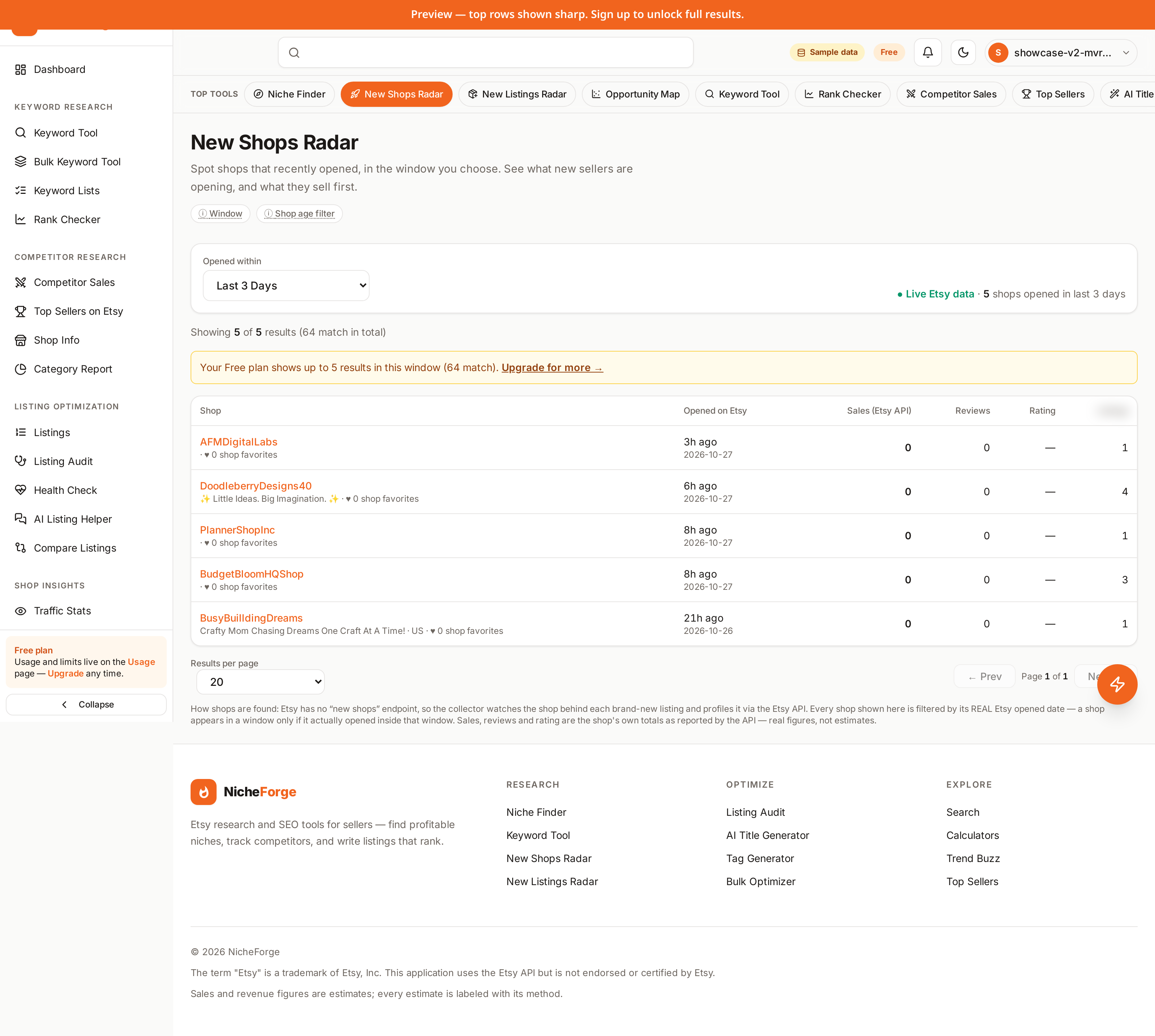
A new shop opening in your niche is news, but only if you catch it early. In the first weeks after opening, a shop's choices are visible and untested: its first listings, its prices, its photos, its shop title. Later, results bury those early choices under favorites and reviews, and the chance to learn from them quietly passes. Watching new shops is therefore less about spying on rivals and more about reading the market while it is still forming. This guide shows how to use the New Shops Radar for that job, step by step, without spending your week staring at a feed.
The New Shops Radar collects shops that recently opened on Etsy, in the window you choose. The rest of this guide explains how to pick a window, what to look for in a cluster of new shops, how to separate a real signal from a lone idea, and how to turn a finding into a small test of your own.
Start with a window, not the whole feed
A radar without a window is noise. The radar lets you choose how far back to look, from the last few hours up to a custom range. On paid plans the windows run from 5 hours through 24 hours, 3 days, 5 days, 7 days, 30 days, 60 days, and 90 days, plus a custom range. The Free plan covers 24 hours and 3 days. Pick the window to match the question you are asking.
If you want to know what opened this week, a 7 day window is a sensible default. If you check daily and only want what is new since yesterday, 24 hours keeps the list short. If you are studying a niche you have not watched before, a 30 day window gives you enough arrivals to see a pattern. Start narrow, then widen only when the list is too short to judge.
Look for clusters, not single shops
One new shop is one person's idea. Five new shops in the same niche in the same week is a movement. When you open the radar, scan for repetition first: the same style, the same occasion, the same material, the same price band appearing in several opening shops at once. Clusters tell you where sellers are placing bets right now.
Note the niche of each cluster, not just the shop names. A cluster in a niche adjacent to yours matters as much as one inside it, because styles and occasions migrate: a theme that starts in home decor often reaches weddings and gifts next. Write down each cluster and one line about what its shops have in common. That note becomes the input for the validation step later.
Read a new shop's opening listings
Open a new shop and study its first listings the way a buyer would. What does it sell first? The opening listings reveal what the seller believes is worth trying before any results exist. Note the titles: which words lead, and which buyer phrases repeat? Note the photos: bright and clear, or cluttered? Note the prices: budget, mid range, or premium for the niche?
Also note what is missing. A shop that opens without a clear shop title, with thin descriptions, or with photos that hide the product is leaving room for a careful newcomer. Gaps are not a reason to mock the shop. They are a reason to note what buyers in that niche are not yet getting, so your own listings can offer it.
Separate a real signal from a lone idea
A cluster earns attention, not commitment. Before you act on it, check whether buyers are responding. Come back to the same shops after a few days: are their listings gathering favorites? Are reviews starting to appear? A cluster whose listings sit still may reflect seller excitement rather than buyer demand.
Cross check the niche itself. Score the idea in a niche tool, look at the wider category, and run the money side for a realistic price. If the cluster, the buyer response, and the margin all point the same way, you have a signal worth testing. If they disagree, keep the cluster on your watch list and let another week of evidence decide.
Turn a finding into a short test
Acting on a finding does not mean rebuilding your shop. It means a small, honest test: a focused set of listings in the direction the cluster points, with researched titles and tags, clear photos, and honest descriptions. Price them at a level the margin supports, not at the lowest price in the cluster.
Watch the response closely for the first weeks: views, favorites, and the questions buyers ask. If the response is warm, expand the range. If it is flat, you have spent little and learned something real, and the radar will surface the next candidate. Small tests beat big bets, because the market, not your opinion, delivers the verdict.
A weekly routine that fits in one sitting
Set aside one focused session each week. First, scan the radar in your chosen window for clusters, in your niche and adjacent ones. Second, open the strongest cluster and read its opening listings. Third, note two or three candidates and one reason each earned its place. Fourth, check last week's candidates for buyer response. The whole routine fits in a single sitting, and it keeps you close to the market without consuming your selling week.
Keep the notes. Over a month, your notes become a record of which clusters turned into real demand and which faded. That record sharpens your judgment faster than any single week of watching, because you start to recognize the early shape of a movement before it is obvious to everyone.
Frequently asked questions
What window should I start with?
A 7 day window is a sensible start for a weekly check: it is long enough to show a pattern and short enough to read in one sitting. If you check daily, use 24 hours. If you are studying a new niche for the first time, widen to 30 days to gather enough arrivals to judge.
Do I need a paid plan to use the radar?
No. The Free plan includes the radar with 24 hour and 3 day windows. Paid plans add wider windows, from 5 hours through 90 days plus a custom range, and higher daily limits on live lookups. Every plan includes the full toolkit, so the radar itself is not locked behind a plan.
Does a new shop mean a new seller?
Usually, but not always. A recently opened shop is new to the marketplace, which is what the radar shows. What matters for your research is not the seller's history but the shop's opening choices: its first listings, prices, and presentation, which reveal what it believes buyers want right now.
How often should I check the radar?
Once a week is enough for most sellers. Daily checks add noise without adding decisions, unless you are tracking a fast moving niche around a seasonal peak. Keep a short note each week, and compare this week's clusters with last week's before you act.
Conclusion
Fresh competition is easiest to learn from when it is fresh: opening listings are visible, prices are unsettled, and no results yet hide the seller's reasoning. Watch the radar weekly, favor clusters over single shops, validate with buyer response and margin, and test small. Do that consistently, and you will often see where your niche is heading while there is still room to move.
Try it free: open the New Shops Radar and scan this week's new shops.
Get started free →The term "Etsy" is a trademark of Etsy, Inc. This application uses the Etsy API but is not endorsed or certified by Etsy.
More from News
- How to Find a Profitable Etsy Niche: A Beginner's Guide (Niche Research · 7 min)
- Etsy Keyword Research: Choosing Keywords That Match Buyers (Keyword Research · 6 min)
- Reading Demand vs Competition for an Etsy Niche (Niche Research · 6 min)
- Etsy Listing SEO Checklist: Titles, Tags, Descriptions (Listing SEO · 6 min)
- Spotting New Etsy Shops and Trends Early (Trends · 7 min)
- New Listings Radar: First Created Date Versus Renewal Date, and Why It Matters (Trends · 6 min)
- How to Read a Niche Score: Demand, Competition, and Opportunity Explained (Niche Research · 6 min)
- Etsy Keyword Research Without Official Search Volume: What Live Listings Can and Cannot Tell You (Keyword Research · 6 min)
- How to Do a Keyword Gap Check Against a Competitor Shop (Keyword Research · 6 min)